AI Development Tools: The Complete Guide to 10x Your Productivity
I've tested every AI development tool out there. Some are game-changers. Others are just hype.
Let me show you which AI development tools actually work and how to use them to 10x your productivity.
> [!NOTE]
> Key Takeaways
> - AI tools can automate up to 70% of repetitive coding tasks.
> - The best tools integrate seamlessly into your existing IDE (VS Code, JetBrains).
> - Don't just look for code generation—look for testing, review, and deployment automation.
What Are AI Development Tools?
AI development tools use artificial intelligence to help developers write, test, review, and deploy code faster. We're not just talking about simple autocomplete anymore.
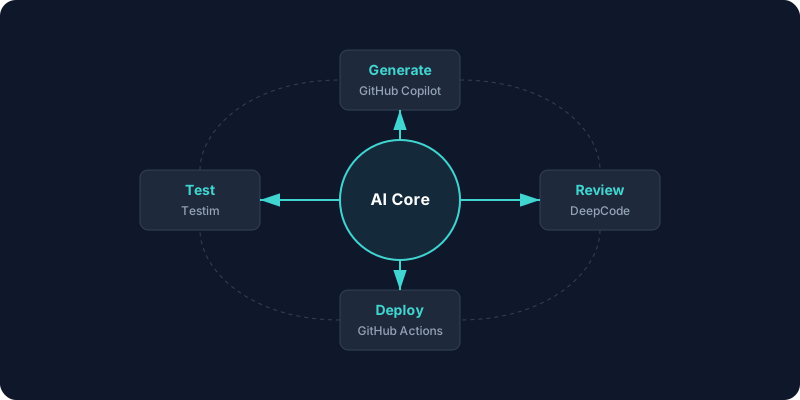
Modern AI tools can:
- Generate code from natural language descriptions
- Review code for bugs and security issues
- Write tests automatically
- Suggest improvements based on best practices
- Automate deployment pipelines
The best AI development tools don't just help you code. They transform your entire workflow.
Why AI Development Tools Matter
Here's the reality: Most developers spend 70% of their time on tasks that AI development tools can handle.
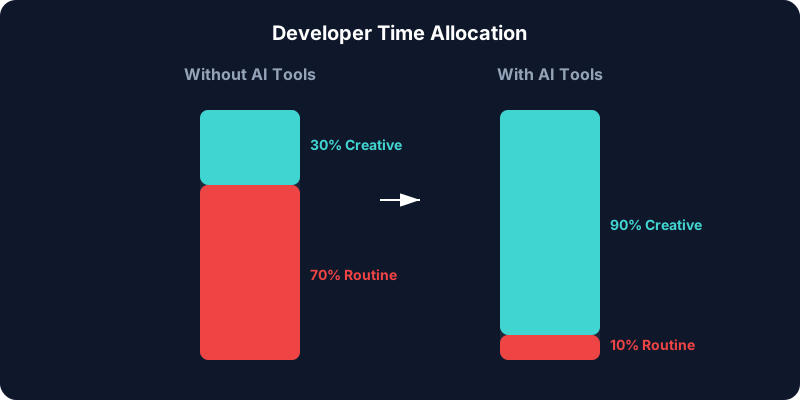
That's time you could spend on:
- Solving complex problems
- Designing better architectures
- Building features users actually want
- Learning new technologies
> [!TIP]
> Start by automating your unit tests. This is often the most tedious part of development and where AI tools shine the brightest with high accuracy.
Categories of AI Development Tools
Let me break down the types of AI development tools available today:
1. Code Generation Tools
These tools write code for you based on comments or context.
- GitHub Copilot - Inline code suggestions
- Codeium - Free alternative with good features
- Tabnine - Privacy-focused code completion
- BuildCycle - Complete code generation platform
2. Code Review Tools
AI agents that review your code before a human does.
- DeepCode - Finds bugs and security issues
- CodeRabbit - Automated PR reviews
- Snyk - Security-focused code analysis
3. Testing & Deployment
- Testim - AI-powered test creation
- GitHub Actions - CI/CD with AI assistance
The Best AI Development Tools Right Now
Here are the AI development tools I recommend for 2025:
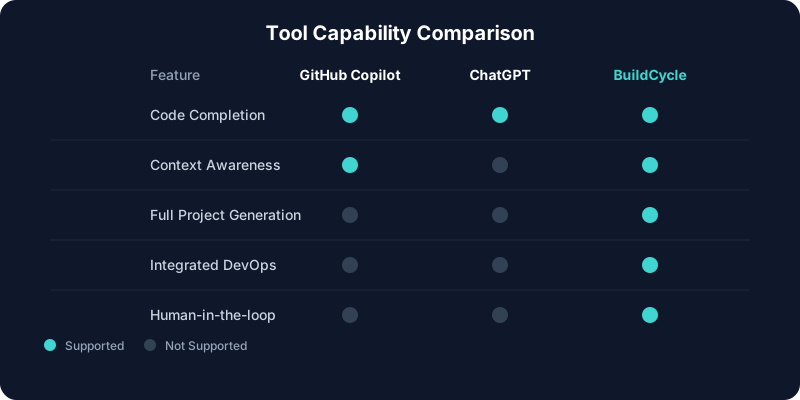
1. GitHub Copilot
Best for: Individual developers
Cost: $10/month
Seamless integration with VS Code and other IDEs. It saves hours of typing boilerplate code.
            // Example: Copilot generating a complex sort function
            function sortUsersByActiveStatusAndDate(users) {
              return users.sort((a, b) => {
                if (a.isActive === b.isActive) {
                  return new Date(b.lastLogin) - new Date(a.lastLogin);
                }
                return a.isActive ? -1 : 1;
              });
            }
2. BuildCycle
Best for: Teams building full applications
Cost: Pay-per-use
BuildCycle handles the entire development cycle, not just code snippets. From requirements to deployed application.
3. Codeium
Best for: Teams on a budget
Cost: Free
Good features without the price tag. Excellent for students and startups.
> [!WARNING]
> Privacy Check: Always check if your AI tool uses your code for training data. For enterprise use, ensure you opt-out of data sharing or use a privacy-first tool like Tabnine or BuildCycle's enterprise tier.
How to Choose the Right Tool
Here's my framework for choosing AI development tools:
1. Identify Your Pain Points (Is it writing boilerplate? Debugging? CSS?)
2. Check Integration (Does it work in VS Code/JetBrains?)
3. Consider Privacy (Cloud vs. Local processing)
4. Evaluate Cost vs. Value (If it saves 5 hours/month, it pays for itself)
Conclusion
AI development tools are no longer optional. To stay competitive, you need to integrate them into your workflow. Start with GitHub Copilot for coding and BuildCycle if you want to automate the entire factory process.
Ready to build software in 10% of the time? Join the BuildCycle Waitlist